Tutorial: Create a Morays experiment for NEMO
In this tutorial we will create a Morays experiment for NEMO from scratch. Objective is to deploy the ML model proposed by Wu et al. 2025 (W25) within the C1D_PAPA NEMO config.
- Prerequisites to the tutorial:
- or:
Installed Apptainer
Morays container (see below)
Apptainer on Linux
# For Ubuntu
sudo apt update && sudo apt install -y software-properties-common
sudo add-apt-repository -y ppa:apptainer/ppa
sudo apt update && sudo apt install -y apptainer

# For amd64 Debian
sudo apt update
sudo apt install -y wget
cd /tmp
wget https://github.com/apptainer/apptainer/releases/download/v1.4.3/apptainer_1.4.3_amd64.deb
sudo apt install -y ./apptainer_1.4.3_amd64.deb
Warning
For other Linux distributions, please refer to this guide.
Apptainer on macOS
# Apptainer is available on macOS via LIMA (LInux virtual MAchines)
brew install qemu lima  # Install with brew
port install qemu lima  # Install with macports

# Create Linux VM with Apptainer
limactl start template://apptainer
limactl shell apptainer
# IMPORTANT: type 'cd' to go in VM home, 'pwd' should return '/home/<your_name>.linux'
cd

# NB1: copy files from VM to host
limactl cp apptainer:/path/to/file  /host/destination
Run Morays container
# Get your hardware architecture
uname -m
#  aarch64 --> arm64
#  x86_64  --> amd64
ARCH=arm64

# Download image
wget https://github.com/morays-community/morays-doc/releases/download/containers/morays_env_${ARCH}.sif

# Run container: should print " >>>> Welcome in Morays environment ! <<<< "
apptainer run --writable-tmpfs --bind $(pwd):/home/jdoe/to_host morays_env_${ARCH}.sif
Introduction
C1D_PAPA is a 1D column NEMO configuration used to isolate and study vertical processes. It models turbulent-mixing behaviour over 1 year at Ocean Station PAPA, located in the North Pacific Ocean. For the tutorial, we will use a slightly modified version of the test case in which the vertical grid is regularly discretized on 32 depth levels over 200m, denoted hereafter as C1D_PAPA32.
The work of W25 takes place in the context of parameterizing air–sea fluxes with their statistically variable behavior, which is absent from deterministic bulk algorithms. The objective is to estimate the mean and variance of a stochastic process at each grid cell. These estimates are intended to be used for a stochastic prediction of momentum and heat fluxes at the ocean surface. We aim to use the W25 ML model to improve the results of a C1D_PAPA32 simulation. The model relies on an artificial neural network (ANN) that takes ocean temperature, air temperature, specific humidity, wind speed, and air pressure at ocean surface as inputs. It returns the mean and standard deviation for wind stress, latent and sensible heat fluxes.
The ANN is written with native Python libraries while NEMO is written in Fortran. Since NEMO has an OASIS3-MCT interface, we can use the Eophis library to couple an external Python script that will contain the W25 model.
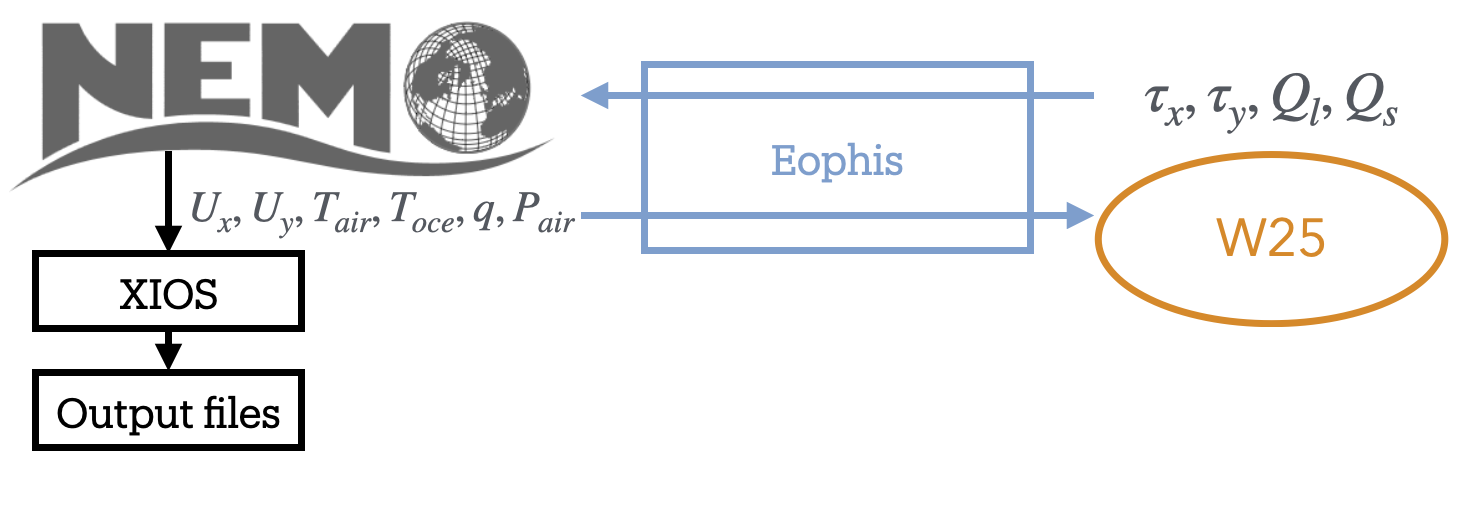
- The final experiment will execute the following steps:
NEMO models turbulent mixing in the C1D_PAPA32 configuration
It sends the inputs variables to the Python script running W25
W25 model computes the mean and standard deviation of the air-sea fluxes from inputs
Outputs are sent back to NEMO and used for stochastic computation of air-sea fluxes
Results are used as surface boundary condition and written in an output file with XIOS
1. Run standard C1D_PAPA32
We start by running standard C1D_PAPA32 without W25. In this case, air-sea fluxes are computed with NCAR bulk formula. Get a copy of NEMO v4.2.1:
# Clone NEMO
mkdir -p ~/to_host
cd ~/to_host
git clone --branch 4.2.1 https://forge.nemo-ocean.eu/nemo/nemo.git nemo_v4.2.1
Inputs, config material and arch file for C1D_PAPA32 are accessible in this repository:
# Clone C1D_PAPA32
cd ~/to_host/nemo_v4.2.1/cfgs/
git clone https://github.com/alexis-barge/C1D_PAPA32.git
Build config:
# Create C1D_PAPA32 test case
cd ~/to_host/nemo_v4.2.1
echo "C1D_PAPA32 OCE" >> cfgs/work_cfgs.txt

# Compile -- adapt arch file if you are not running Morays container
cp cfgs/C1D_PAPA32/arch-C1D_PAPA32_GCC.fcm   arch/
./makenemo -m "C1D_PAPA32_GCC" -r C1D_PAPA32 -j 3
and run NEMO:
cd ~/to_host/nemo_v4.2.1/cfgs/C1D_PAPA32/EXP00
./nemo
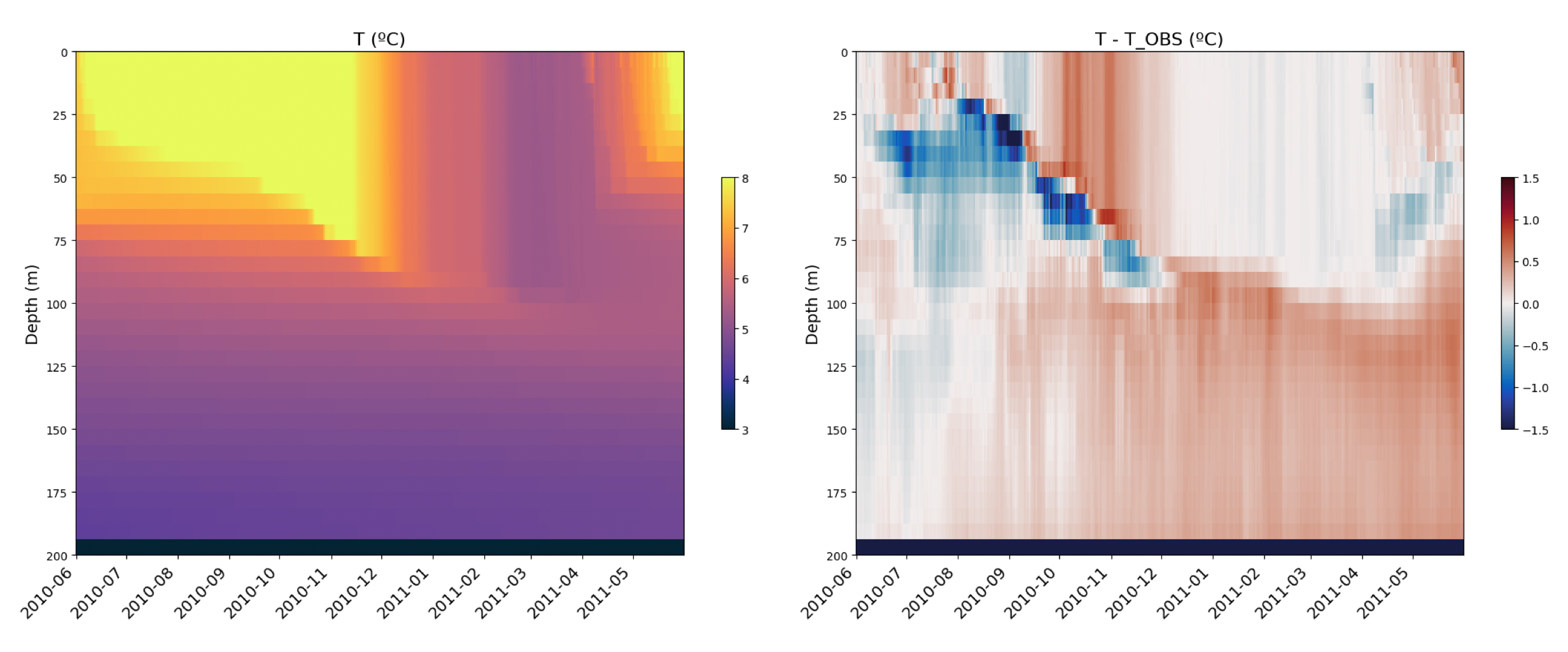
You should find netcdf files C1D_PAPA32_1d_20100615_20110614_grid_<T,U,V,W>.nc when done. Scripts to plot profiles against time are provided:
# Get plotting scripts and references
cd ~/to_host/nemo_v4.2.1/cfgs/C1D_PAPA32/EXP00
ln -s ../PLOTS/* .

# Plot, you might need to exit container (and lima VM) to visualize figures
python3 ./plots_res.py
python3 ./plots_diff.py
2. Run W25 model
We have an operating NEMO configuration. Let’s focus now on the W25 model. As mentionned earlier, it must be written in an external Python script. W25 code and an implementation of the model are provided in this repository:
# Clone and install W25 model
cd ~/to_host/
git clone https://github.com/TRACCS-COMPACT/AG2025-workshop-ocean-ml-coupling.git  W25
cd W25/W25/W25ANN
pip install -e .
Edit ~/to_host/W25/W25/models.py, a function W25ann() taking numpy arrays for all required inputs is already defined. Complete W25ann() as follows to convert the arrays into torch tensors, and pass them in the ANN to predict mean and standard deviation for the air-sea fluxes:
# Format inputs model
X = np.hstack([U.reshape(-1,1), To.reshape(-1,1), Ta.reshape(-1,1),
              rh.reshape(-1,1), p.reshape(-1,1)]).astype('float32')
X = torch.tensor(X)

# Predict fluxes
M_mean = M.pred_mean(X).detach().numpy().squeeze()
M_std = M.pred_var(X).detach().numpy().squeeze() ** 0.5
SH_mean = SH.pred_mean(X).detach().numpy().squeeze()
SH_std = SH.pred_var(X).detach().numpy().squeeze() ** 0.5
LH_mean = LH.pred_mean(X).detach().numpy().squeeze()
LH_std = LH.pred_var(X).detach().numpy().squeeze() ** 0.5
Note that stochastic fluctuations are generated after this block of code. Script models.py can be executed lonely with user-defined typical values as inputs (feel free to modify them). Run it to check that the model works correctly:
python3 ./models.py
# Should print:
#    Res    -- taux: ...
#    Test successful
Note
We have now an operating W25 script. However, models.py does not possess an OASIS3-MCT interface and cannot be coupled with NEMO. In the next sections, we will build the Eophis scripts and configure NEMO to set up the coupling.
3. Set up coupling environment
Time has come to install Eophis:
# Clone and install Eophis_v1.1.0
cd ~/to_host
git clone --branch v1.1.0 https://github.com/meom-group/eophis eophis_v1.1.0
cd eophis_v1.1.0
pip install .
Define the exchanges
An Eophis script is provided in the W25 repository (~/to_host/W25/W25/main.py). The script may execute preproduction() or production(). The first function is used to generate coupling material. The second one contains instructions to perform the coupling itself. For both, we need to define what we want to exchange in ocean_info(). According to the diagram in introduction:
- Eophis needs to receive from NEMO:
surface fields
ux,uy,tair,toce,q,pat each time step, on grid(1,1,1)
- and to send back results from W25:
taux,tauy,Qs,Qlat each time step, on grid(1,1,1)
In Eophis, exchanges are defined in Tunnel. An empty Tunnel TO_NEMO (step 1) already exists:
tunnel_config = list()
tunnel_config.append( { 'label' : 'TO_NEMO', \
                        'grids' : {}, \
                        'exchs' : [ {} ] }
                    )
Define the surface grid on which exchanges will be performed (i.e. 1 point grid):
tunnel_config = list()
tunnel_config.append( { 'label' : 'TO_NEMO', \
                        'grids' : { 'C1D' : {'npts' : (1,1)} }, \
                        'exchs' : [ {} ] }
                    )
What remains is to define exchanges themselves. According to NEMO namelist, time step is 1800s. Following Tunnel documentation, we can complete exchanges definition with:
tunnel_config = list()
tunnel_config.append( { 'label' : 'TO_NEMO', \
                        'grids' : { 'C1D' : {'npts' : (1,1)} }, \
                        'exchs' : [ {'freq' : 1800, 'grd' : 'C1D', 'lvl' : 1, 'in' : ['ux','uy','toce','tair','p','q'], 'out' : ['taux','tauy','Qs','Ql']} ] }
                    )
The exchange line may be read as:
every
1800seconds, execute the receiving of fieldux,uy,toce,tair,p,qand the sending back of fieldstaux,tauy,Qs,Qlon the first level of gridC1D.
Create Tunnel object (step 2) with:
to_nemo, = eophis.register_tunnels( tunnel_config )
Generate OASIS3-MCT material
OASIS3-MCT material is generated with write_coupling_namelist(), which requires total simulation time as argument. This information is available in NEMO namelist namelist_cfg. The latter is read and returned by ocean_info():
nemo_nml = eophis.FortranNamelist('~/to_host/nemo_v4.2.1/cfgs/C1D_PAPA32/EXPREF/namelist_cfg')
Thus, get namelist parameters (step 3) with:
step, it_end, it_0 = nemo_nml.get('rn_Dt','nn_itend','nn_it000')
total_time = (it_end - it_0 + 1) * step
and use them to write OASIS3-MCT namelist (step 4):
eophis.write_coupling_namelist( simulation_time=total_time )
Eophis preproduction script is ready to be executed:
python3 ./main.py --exec preprod
Four files have been created: Eophis logs eophis.out, eophis.err, OASIS3-MCT namelist namcouple, and Eophis Fortran namelist eophis_nml.
Connect models
We complete function production() to drive exchanges all along the run. Since the Tunnel is already created, deploy the OASIS3-MCT interface (step 5) with:
eophis.open_tunnels()
Coupling is effective. Fields can be received and used as arguments for W25. Import it (step 6):
from models import W25ann
Exchanges must be synchronized in time, this is done by Loop. Loop requires a Tunnel to work with, number of time iteration, and time step value. Define Loop (step 7) as follows:
@eophis.all_in_all_out( geo_model=to_nemo, step=step, niter=niter )
Final step is to specify connexions between the exchanged data and W25. Connect received data, data to send and W25 in loop_core() (step 8):
def loop_core(**inputs):
    """
    Content of loop_core is a Router. Connexions between exchanged variables and models are defined here.
    inputs dictionnary contains variables defined in Tunnel exchanges, and received by Eophis from NEMO.

    """
    packed_res = W25ann( inputs['ux'], inputs['uy'], inputs['toce'], inputs['tair'], inputs['p'], inputs['q'] )

    outputs= {}
    outputs['taux'], outputs['tauy'], outputs['Qs'], outputs['Ql'] = packed_res

    return outputs
Note that all these components describe only pipelines, identified by the field names. We will now configure NEMO in accordance with the coupling environment defined by Eophis. The objective is to choose which array will be passed through OASIS3-MCT along these pipelines.
4. Build C1D_PAPA32.W25
OASIS3-MCT-built NEMO
C1D_PAPA32.W25 models the same C1D_PAPA32 ocean circulation. Duplicate the case:
# Create C1D_PAPA32.W25 test case
cd ~/to_host/nemo_v4.2.1/cfgs
mkdir C1D_PAPA32.W25
echo "C1D_PAPA32.W25 OCE" >> work_cfgs.txt

# Copy C1D_PAPA32 material
cp -r C1D_PAPA32/EXPREF   C1D_PAPA32.W25/
cp -r C1D_PAPA32/MY_SRC   C1D_PAPA32.W25/
cp -r C1D_PAPA32/FORCING  C1D_PAPA32.W25/
and update experiment name in NEMO namelist:
cd ~/to_host/nemo_v4.2.1/cfgs/C1D_PAPA32.W25/EXPREF
vi namelist_cfg
    # ...
    cn_exp      = "C1D_PAPA32.W25" !  experience name
This configuration must be compatible with an OASIS3-MCT build. OASIS3-MCT interface in NEMO is activated by key_oasis3 CPP key. We add it to those already used by C1D-PAPA32:
# Create CPP key file
echo " bld::tool::fppkeys   key_xios key_linssh key_oasis3" >> ~/to_host/nemo_v4.2.1/cfgs/C1D_PAPA32.W25/cpp_C1D_PAPA32.W25.fcm
OASIS3-MCT and XIOS (compiled with OASIS3-MCT) must be linked during NEMO compilation. Duplicate C1D_PAPA32 arch file and include them:
# New arch file
cd ~/to_host/nemo_v4.2.1/arch
cp arch-C1D_PAPA32_GCC.fcm   arch-C1D_PAPA32_W25_GCC.fcm

# Modify following lines: template is valid for Morays container
vi arch-C1D_PAPA32_W25_GCC.fcm
    # ...
    %XIOS_HOME      /home/jdoe/XIOS_OASIS
    %OASIS_HOME     /home/jdoe/oasis3-mct/BLD
    # ...
    %OASIS_INC      -I%OASIS_HOME/include -I%OASIS_HOME/build-shared/lib/cbindings
    %OASIS_LIB      -L%OASIS_HOME/lib -loasis.cbind -lpsmile.MPI1 -lmct -lmpeu -lscrip
    # ...
    %USER_INC       %XIOS_INC %OASIS_INC %NCDF_INC
    %USER_LIB       %XIOS_LIB %OASIS_LIB %NCDF_LIB
Finally configure XIOS to be aware of OASIS3-MCT environment:
vi ~/to_host/nemo_v4.2.1/cfgs/C1D_PAPA32.W25/EXPREF/iodef.xml
    # ...
    <variable id="using_oasis"               type="bool">true</variable>
Minimal NEMO sources modifications are required to set up a hybrid Python-NEMO experiment. Those modifications are provided by Morays patch. It enables creation of independent OASIS3-MCT modules. It can be obtained in this repository:
# Get Morays patch
cd ~/to_host/
git clone https://github.com/morays-community/Patches-NEMO.git
We transfer Morays sources for NEMO_v4.2.1 OCE module to our case:
cp ~/to_host/Patches-NEMO/NEMO_v4.2.1/OCE/* ~/to_host/nemo_v4.2.1/cfgs/C1D_PAPA32.W25/MY_SRC/
Configure NEMO
Morays patch comes with pre-defined Python communication modules pyfld.f90 and pycpl.F90. Edit pyfld.F90 to allocate arrays where fields returned by W25 will be stored:
vi ~/to_host/nemo_v4.2.1/cfgs/C1D_PAPA32.W25/MY_SRC/pyfld.F90
! Line 26
REAL(wp), PUBLIC, ALLOCATABLE, SAVE, DIMENSION(:,:)  :: ext_qs, ext_ql, ext_taux, ext_tauy
! Line 46
ALLOCATE( ext_taux(jpi,jpj), ext_tauy(jpi,jpj), ext_qs(jpi,jpj), ext_ql(jpi,jpj) )
! Line 65
DEALLOCATE( ext_taux, ext_tauy, ext_qs, ext_ql )
Import communication modules in sbcblk.F90, as it is the location of air-sea fluxes computation:
cp ~/to_host/nemo_v4.2.1/src/OCE/SBC/sbcblk.F90   ~/to_host/nemo_v4.2.1/cfgs/C1D_PAPA32.W25/MY_SRC/
vi ~/to_host/nemo_v4.2.1/cfgs/C1D_PAPA32.W25/MY_SRC/sbcblk.F90
! Line 44
USE pyfld
USE pycpl
The functions in NEMO for sending or receiving arrays to or from Python in accordance with Eophis are send_to_python() and receive_from_python(), respectively. They take the field name defined in Eophis exchanges, the array to send or in which to store the results, and the current NEMO time step as arguments. Proceed sendings and receptions in sbcblk.F90 with:
! Line 820
CALL send_to_python('ux', pwndi, kt)
CALL send_to_python('uy', pwndj, kt)
CALL send_to_python('tair', ptair - 273.15_wp, kt)
CALL send_to_python('toce', pst, kt)
CALL send_to_python('q', pqair, kt)
CALL send_to_python('p', pslp, kt)

CALL receive_from_python('taux', ext_taux, kt)
CALL receive_from_python('tauy', ext_tauy, kt)
CALL receive_from_python('Qs', ext_qs, kt)
CALL receive_from_python('Ql', ext_ql, kt)
Then, overwrite NEMO air-sea fluxes with results from the Python model:
! Line 832
psen(:,:) = ext_qs(:,:) * tmask(:,:,1)
plat(:,:) = ext_ql(:,:) * tmask(:,:,1)
taum(:,:) = SQRT(ext_taux(:,:)**2 + ext_tauy(:,:)**2)  * tmask(:,:,1)
Finally build C1D_PAPA32.W25:
# Compile
cd ~/to_host/nemo_v4.2.1/
./makenemo -m "C1D_PAPA32_W25_GCC" -r C1D_PAPA32.W25 -j 3
5. Run C1D_PAPA32.W25
Complete C1D_PAPA32.W25 config with Eophis and W25 Python scripts:
# Get Python material
cp ~/to_host/W25/W25/*.py   ~/to_host/nemo_v4.2.1/cfgs/C1D_PAPA32.W25/EXP00
Re-execute Eophis preproduction in config and run NEMO-Eophis:
cd ~/to_host/nemo_v4.2.1/cfgs/C1D_PAPA32.W25/EXP00
python3 ./main.py --exec preprod
mpirun -np 1 ./nemo : -np 1 python3 ./main.py --exec prod
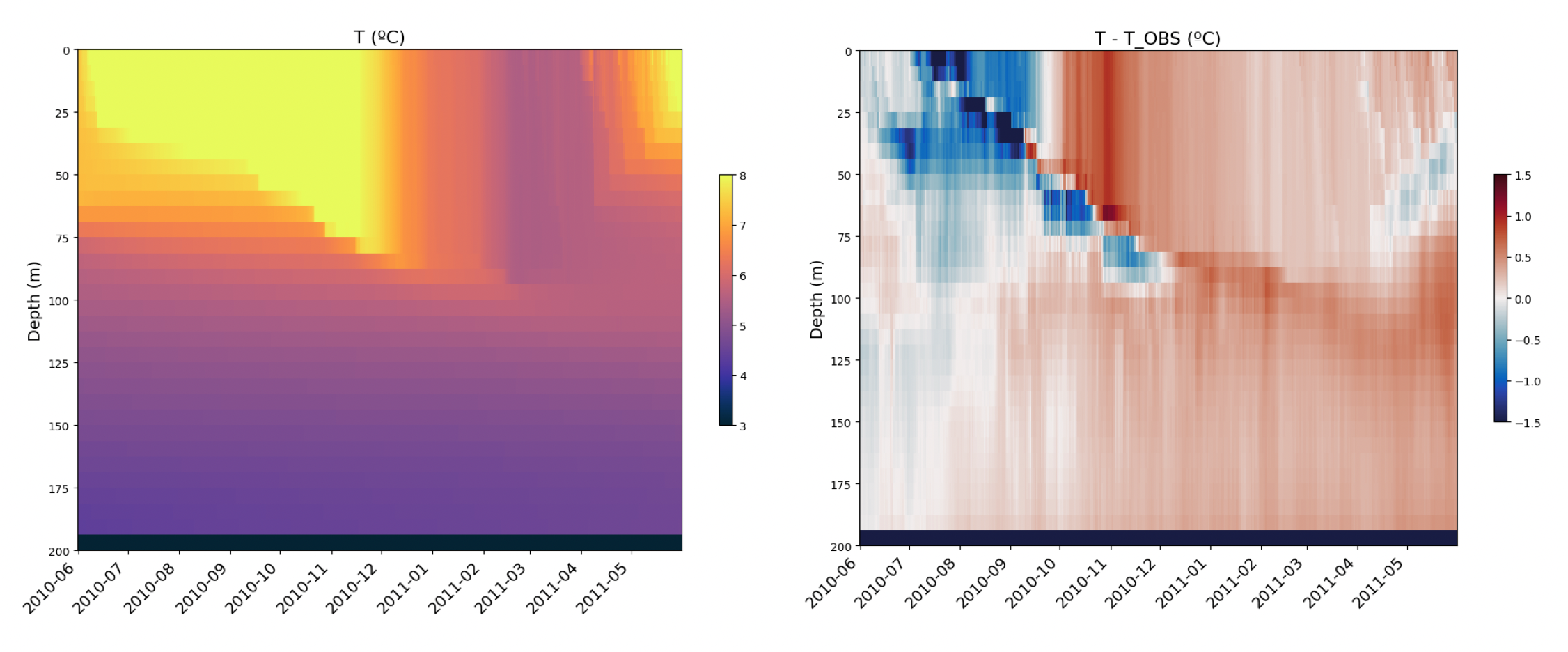
As for C1D_PAPA32, you should find some netcdf files. Use same scripts to plot results:
# Get plotting scripts and references
cd ~/to_host/nemo_v4.2.1/cfgs/C1D_PAPA32.W25/EXP00
ln -s ../../C1D_PAPA32/PLOTS/* .

# Plot, you might need to exit container (and lima VM) to visualize figures
python3 ./plots_res.py
python3 ./plots_diff.py
Going further
You have seen the minimal steps to set up a hybrid Python-NEMO experiment in Morays framework. We invite you to read Eophis tutorial and configuration guide for NEMO to discover advanced coupling features.
If this tutorial helped you to build a new Morays experiment with NEMO, it would be greatly apreciated if you could contribute to the Morays collection.